Rendering real Android Automotive devices on a server: Cuttlefish and an AI-first testing portal
June 21, 2026 #android-automotive#cuttlefish#testing#ai#infrastructure#aaos
Testing an Android Automotive (AAOS) app properly is annoying in a way that phone apps are not. The app has to look right across a spread of head units: different AAOS versions, resolutions, pixel densities, day and night themes, and OEM compatibility modes. You can buy a few head units and a Pixel Tablet and test by hand, but that does not scale, and it is exactly the kind of repetitive work that gets skipped under deadline pressure.
So I built Auto App Test, the thing I actually wanted: a testing portal where you hand it an APK and a target, and it boots a real AAOS device, installs the app, drives it, captures screenshots, runs checks, and hands back a verdict. The whole portal is API-first and AI-first: there is an HTTP API and an MCP server so an agent can do all of this without a human in the loop, and it is built to scale sideways by adding more virtual devices.
This post is the technical writeup: why Cuttlefish, how to set it up, and how the pieces fit together.
What it looks like
Here is the weather app from automotive-apps.com running on a live virtual AAOS device, streamed into the browser and embedded inside the developer portal of the Auto App Store, a sister project of mine:
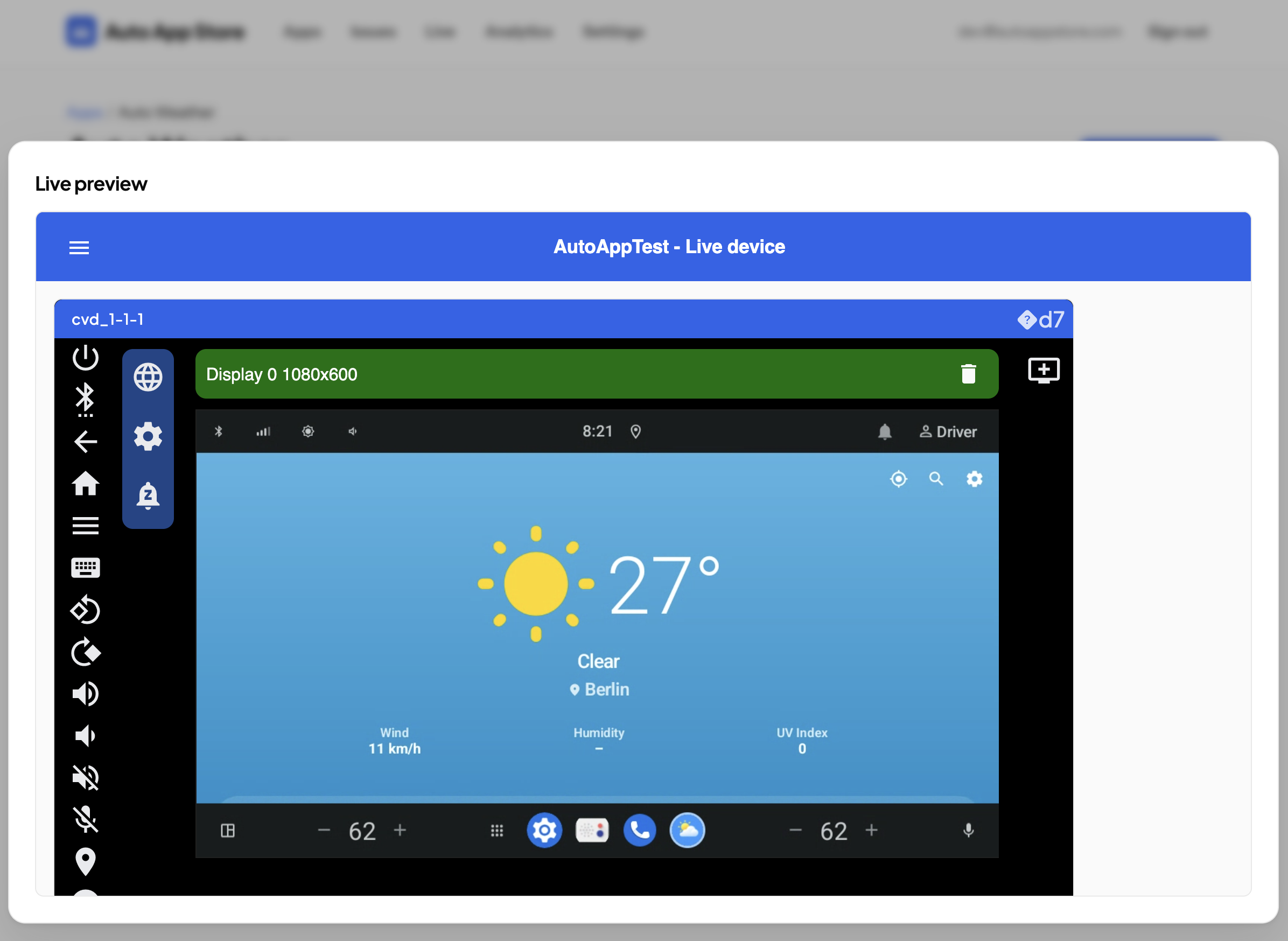
That is not a screenshot of an emulator on my desk. It is a headless device on a server in a datacenter, rendered with software graphics, streamed over WebRTC, and framed into a completely different web app over an authenticated session.
Why Cuttlefish
Cuttlefish is Google’s
configurable virtual Android device. It is the reference target Google uses for
Android itself, it runs headless on a Linux server, it is KVM-accelerated, and
it is fully scriptable through a CLI (cvd). Crucially for me, it supports AAOS
images and ships a WebRTC stack for streaming the display.
The alternatives did not fit. Physical head units are faithful but do not scale, cannot be reset cleanly between runs, and cannot be embedded in a web product. The Android Studio emulator is fine on a laptop but is heavier to run headless at scale and is a step further from a real AAOS target. Cuttlefish gives you a real device you can create, boot, drive, snapshot, and throw away from a script, which is the whole game when the goal is “an agent runs hundreds of these.”
Setting up Cuttlefish
A note on GPUs
The best setup would be a GPU server: rendering is faster and that is the right
call if raw performance is critical. But GPU servers are expensive, so I opted for
the current state - a plain non-GPU bare-metal box with software rendering -
which has been more than good enough for my needs. The nice part is that this is
not a one-way door: the only thing that changes is the --gpu_mode flag, so
switching to a GPU server later is a one-line change.
What you genuinely cannot skip is nested virtualization (/dev/kvm), which most
cheap cloud VMs do not offer. That is the real reason to be on bare metal. A
Hetzner bare-metal box has KVM and is cheap enough to leave running.
Install Cuttlefish
Cuttlefish ships as a couple of Debian packages that set up the cvd-* network
bridges, the udev rules, and the kvm / cvdnetwork groups your user needs:
# build (or download) the host packages, then:
sudo apt install ./cuttlefish-base_*.deb ./cuttlefish-user_*.deb
sudo usermod -aG kvm,cvdnetwork "$USER"
sudo reboot   # the group + udev changes need a reboot to take effect
After the reboot, fetch an AAOS Cuttlefish build - the host tools plus the device image - into a working directory. Google publishes Cuttlefish AAOS targets you can pull with the fetch tool, or you build your own.
Create a WebRTC device
This is the part I think is genuinely cool: one command and you have a booting Android Automotive head unit, streamable over WebRTC.
cvd create \
  --gpu_mode=gfxstream_guest_angle_host_swiftshader \
  --cpus=12 --memory_mb=16384 \
  --start_webrtc=true \
  --tcp_port_range=15550:15599 \
--udp_port_range=15550:15599--gpu_mode=gfxstream_guest_angle_host_swiftshaderis the software-rendering mode (this is the flag you would swap on a GPU host).--start_webrtc=trueis what makes the device streamable.- the TCP/UDP port ranges are the WebRTC media ports - open them on the host firewall, because the media flows over real UDP straight to the client.
One operational note without the config: run cvd from a long-lived process (a
systemd service), not from your SSH session, or the device dies when the shell
does. Everything I run - device, worker, operator, networking - is a systemd unit,
and that was the single biggest stability win.
How the WebRTC streaming fits together
With --start_webrtc=true the device runs a WebRTC streamer. A separate
operator process brokers the signaling between that streamer and the browser
client (the offer/answer handshake and ICE candidates); the media itself then flows
over the UDP range above, directly to the client. To expose it publicly I put a
reverse proxy (Caddy) in front of the operator’s TLS port so it terminates
certificates, and the browser loads the operator’s web client from there.
Two things were worth the time: the prebuilt operator did not quite work for embedding, so I built the Go operator and its web client from source so the versions match; and because the media is real UDP, the port range has to be reachable from the client, not just the signaling port.
Networking the guest
Two networking details matter, and both are just a handful of ufw / iptables
rules rather than anything you need pasted here. First, the guest reaches the host
services it needs over the cvd bridge subnets (192.168.9x.0/24); a default-deny
firewall will block that and the device will not finish booting, so those subnets
have to be allowed. Second, for apps that need the internet, the host has to NAT
those same guest subnets out, DNS included - the giveaway for missing DNS is
Android reporting “no internet” even though raw IP works. Install both as a boot
service so a later docker restart cannot quietly flush the nat table from under
you.
The live view
The picture at the top is the operator’s WebRTC stream embedded in another web app. Two things make that embed work without a login prompt and across origins:
- Auth without a login prompt. Opening a session from the portal mints a short-lived signed token; the reverse proxy validates it and sets a session cookie, so the operator’s bundles and the signaling WebSocket are authenticated with no separate sign-in.
- Cross-site embedding. Embedding
live.example.cominsideotherapp.comis a third-party context, so the session cookie isSameSite=None; Secure; Partitioned(CHIPS) to survive third-party-cookie blocking, and the live view’sframe-ancestorsCSP is an operator-managed allowlist of consumer origins. That is what lets a different product frame the device and have it just work.
The architecture
The device is the hard part; the rest is a fairly ordinary backend wrapped around it.
  agent / platform  (X-API-Key)
         |
         v
  Caddy (auto-TLS)  ->  api.*  /  app.*  /  live.*
         |
         v
  Go backend  +  MCP server
         |  +--> Postgres   (runs, verdicts, metadata)
         |  +--> MinIO      (APKs, screenshots)
         v
  worker  --adb-->  Cuttlefish AAOS device  --WebRTC-->  live view
( everything on one bare-metal host with /dev/kvm )- A Go backend exposes the REST API, an MCP server, and the external developer API. Postgres holds the metadata; MinIO holds APKs and screenshots.
- A worker on the host drives each run over
adb: install the APK, launch and smoke-test it (did it crash?), capture a screenshot, run accessibility and layout checks, and emit verdicts. - Caddy terminates TLS for the
api,app, andlivesubdomains.
The point: API-first, AI-first, MCP
Everything above exists so that a machine can do it. The consumer of Auto App Test is not a person clicking buttons; it is another platform or an agent.
A “validation” is the core verb: an APK plus a target in, the pipeline runs, and results plus screenshot URLs come out. The whole surface is a small, boring REST API behind an API key:
# submit a build for validation
curl -X POST https://api.auto-apptest.com/v1/validate \
  -H "X-API-Key: aat_..." \
  -F apk=@app-release.apk \
  -F target_id=aaos-cuttlefish
# -> { "validation_id": "57ae...", "status": "queued" }

# poll until terminal
curl https://api.auto-apptest.com/v1/validate/57ae... -H "X-API-Key: aat_..."
# -> { "status": "passed",
#      "results":     [ { "source": "a11y", "severity": "info", "message": "..." } ],
# "screenshots": [ { "screen": "home", "url": ".../v1/screenshots/3208..." } ] }- API-first.
POST /v1/validateto test,GET /v1/validate/{id}to poll, orPOST /v1/live-sessionsto spawn a device and get back anembed_urlto iframe. Completion can also be pushed to a signed webhook. No human session anywhere in that loop. - MCP. The same capabilities are exposed over the Model Context Protocol, so an AI agent can pick a target, submit a build, read back the screenshots, and reason about whether the layout is right, as part of its own workflow.
- Scale sideways. Because each device is a disposable Cuttlefish instance on KVM, “test this across ten targets” is ten devices, not ten desks. The bottleneck is host CPU and memory, both of which you buy by the box.
The screenshot at the top is that idea closing the loop: the Auto App Store asks Auto App Test, over an API key, to spin up a device with a developer’s app installed, and embeds the live result in its own UI. No human touched the device.
What worked best
- Bare-metal KVM plus software rendering. No GPU needed, predictable, cheap, scales - and a one-flag switch to a GPU host if performance ever demands it.
- systemd for everything. Device, worker, operator, guest networking. Decoupled, reboot-surviving, debuggable.
- Build the operator from source. Matching the operator and its web client versions removed a whole category of “why is the device list empty” bugs.
- Signed-token SSO plus a Partitioned cookie. This is what turns “a device on a server” into “a device embedded in someone else’s product.”
Closing
The short version: use Cuttlefish, run it on bare metal for KVM, render in software (swap one flag for a GPU later if you need it), and wrap every piece in systemd. Once that is in place you have a real Android Automotive device you can create and destroy from a script, and from there it is “just” a backend.
The app in the screenshot is Auto Weather, one of my own Android Automotive apps. Being able to watch it run on a virtual head unit in a browser tab, launched by an API call, is the part that still feels a bit like magic.